 Goshikq
Tool succeeded
The worker ran. The processor accepted. Studio can show COMPLETED. That is not a business outcome.
Stable 1.0.1 Open-source AI agent framework · Apache 2.0
Open-source AI agent framework with a Rust runtime for durable execution, multi-agent orchestration, and evidence-backed business outcome verification. Python and TypeScript SDKs. Apache 2.0.
Stable release: GitHub Release v1.0.1, PyPI goshikq-ai 1.0.1, and npm @goshikq/sdk 1.0.1. Python is selected first. An SDK install does not start goshikq-server. The runtime is a separate install. COMPLETED is not VERIFIED unless the goal predicate accepts authoritative state.
What you install: goshikq-ai 1.0.1 from PyPI. This package does not install or start goshikq-server. Start the standalone runtime first, then run an SDK program against it. CPython 3.11 through 3.14. A finished run can be COMPLETED and still be unverified. VERIFIED requires a goal predicate that accepts authoritative state. goshikq-ai 1.0.1 on PyPI · Installation guide
pip install goshikq-ai==1.0.1After that install, with the runtime already healthy, save the program below as sdk_hello.py and run python sdk_hello.py. No paid model key is required. Expected lines include verification: VERIFIED.
"""Standalone Python SDK example. Run it from any directory after the package is installed.

The package is not on PyPI yet. Install a built wheel, then run this file.
The runtime must already be healthy at GOSHIKQ_RUNTIME_URL (default http://127.0.0.1:7400).
No paid model key is required.
"""

from goshikq_ai import Agent, Goal, Runtime, StateSnapshot, tool
from goshikq_ai.models import MockModel, ModelTurn
from goshikq_ai.state import SnapshotContext

GREETINGS: dict[str, str] = {}


@tool(effect="idempotent_write", idempotent=True, risk="low")
def record_greeting(name: str, message: str) -> dict:
    """Store a greeting for name. Writing the same greeting twice is a no-op."""
    GREETINGS[name] = message
    return {"stored": True, "name": name}


class GreetingState:
    def snapshot(self, context: SnapshotContext) -> StateSnapshot:
        return StateSnapshot(state={"greetings": dict(GREETINGS)}, version=str(len(GREETINGS)), source="greetings-memory")

    def version(self, resource_id: str) -> str:
        return str(len(GREETINGS))


def ada_was_greeted(state: StateSnapshot) -> bool:
    greeting = state.get("greetings.Ada")
    return isinstance(greeting, str) and "Ada" in greeting


def no_more_than_one_greeting(state: StateSnapshot) -> bool:
    greetings = state.get("greetings") or {}
    return len(greetings) <= 1


def main() -> None:
    agent = Agent(
        name="hello-agent",
        model=MockModel(
            script=[
                ModelTurn(tool_calls=[("record_greeting", {"name": "Ada", "message": "Hello, Ada!"})]),
                ModelTurn(content="Greeted Ada."),
            ]
        ),
        instructions="Greet the person named in the input.",
        tools=[record_greeting],
    )
    goal = Goal(
        description="Ada has been greeted exactly once",
        success=ada_was_greeted,
        invariants=[no_more_than_one_greeting],
        max_steps=4,
    )
    result = Runtime(agent, state_provider=GreetingState()).run_sync(goal, input={"name": "Ada"})
    print(result.summary())
    if not result.verified:
        raise SystemExit(1)


if __name__ == "__main__":
    main()
What you install: @goshikq/sdk 1.0.1 from npm. This package does not install or start goshikq-server. Start the standalone runtime first. The package is ESM only. Node.js 20+ runs it with node hello.mjs. CommonJS require() is not supported. The published 1.0.1 page is @goshikq/sdk 1.0.1. TypeScript SDK guide
npm install @goshikq/sdk@1.0.1After that install, with the runtime already healthy, save the program below as hello.mjs in a project that depends on the package. Expected lines include verification: VERIFIED.
/**
 * Standalone Node.js example. ESM only. Node.js 20+.
 * Install @goshikq/sdk first. That package is not on npm yet.
 * The runtime must already be healthy at GOSHIKQ_RUNTIME_URL.
 */
import { z } from "zod";
import { Agent, Goal, MockModel, Runtime, StateSnapshot, defineTool } from "@goshikq/sdk";

const greetings = {};

const recordGreeting = defineTool({
  name: "record_greeting",
  description: "Store a greeting for name.",
  schema: z.object({ name: z.string(), message: z.string() }),
  jsonSchema: {
    type: "object",
    properties: { name: { type: "string" }, message: { type: "string" } },
    required: ["name", "message"],
    additionalProperties: false,
  },
  effect: "IDEMPOTENT_WRITE",
  risk: "low",
  idempotent: true,
  execute: async ({ name, message }) => {
    greetings[name] = message;
    return { stored: true, name };
  },
});

const agent = new Agent({
  name: "hello-agent",
  model: new MockModel({
    script: [
      { tool_calls: [["record_greeting", { name: "Ada", message: "Hello, Ada!" }]] },
      { content: "Greeted Ada." },
    ],
  }),
  instructions: "Greet the person named in the input.",
  tools: [recordGreeting],
});

const goal = new Goal({
  description: "Ada has been greeted exactly once",
  success: (state) => {
    const greeting = state.get("greetings.Ada");
    return typeof greeting === "string" && greeting.includes("Ada");
  },
  invariants: [
    (state) => {
      const stored = state.get("greetings") ?? {};
      return Object.keys(stored).length <= 1;
    },
  ],
  maxSteps: 4,
});

const runtime = new Runtime(agent, {
  stateProvider: {
    snapshot: () =>
      new StateSnapshot({
        state: { greetings: { ...greetings } },
        version: String(Object.keys(greetings).length),
        source: "greetings-memory",
      }),
  },
});

const result = await runtime.run(goal, { input: { name: "Ada" }, timeoutMs: 60_000 });
console.log(`status:        ${result.status}`);
console.log(`verification:  ${result.verificationStatus}`);
if (result.status !== "COMPLETED" || result.verificationStatus !== "VERIFIED") {
  process.exit(1);
}
Recommended install: download the pinned installer, check its SHA256, then run the local file. That is not a remote shell pipe. The script installs both goshikq and goshikq-server from GitHub Release v1.0.1 and stops if SHA256SUMS does not match. It does not install a language SDK. The manual alternative is to download the archive and SHA256SUMS from the release and compare the hash yourself. Installation guide
Install the runtime.
curl -fsSL -o goshikq-install.sh https://raw.githubusercontent.com/goshikavs/goshikq-agent-framework/b830e15efa2f7bd05af0769739c6cab6feb40d97/scripts/install.sh
echo "4630175aa8868d58b634df1043abdd0fae425d78c93326401d41e5ed5a752590  goshikq-install.sh" | sha256sum -c -
sh goshikq-install.sh --version v1.0.1Use the export PATH line the script prints, then verify. Expected text: goshikq 1.0.1.
goshikq --versionStart the local runtime. DATABASE_URL=embedded downloads PostgreSQL on first start and keeps it under .goshikq/postgres unless GOSHIKQ_EMBEDDED_PG_DIR is set. That first download needs network access. GOSHIKQ_AUTH_MODE=none is only for this local process. Production needs a real database URL and real authentication.
DATABASE_URL=embedded GOSHIKQ_AUTH_MODE=none GOSHIKQ_BIND=127.0.0.1:7400 goshikq-servercurl -fsS http://127.0.0.1:7400/healthExpected health body includes "status":"ok" and "version":"1.0.1". Then run the python3 line the installer prints. That file is hello_agent.py next to the binaries. Expected lines include verification: VERIFIED and evidence: greetings-memory@1. A COMPLETED status without VERIFIED means the goal predicate did not accept the snapshot.
Windows AMD64 is the supported archive. The pinned script checks SHA256SUMS, installs both executables from GitHub Release v1.0.1, and prints a PATH line. It does not install a language SDK. You can instead download the zip and SHA256SUMS from the release and compare the hash yourself. Installation guide
Install the runtime.
Invoke-WebRequest -Uri "https://raw.githubusercontent.com/goshikavs/goshikq-agent-framework/b830e15efa2f7bd05af0769739c6cab6feb40d97/scripts/install.ps1" -OutFile goshikq-install.ps1
$actual = (Get-FileHash .\goshikq-install.ps1 -Algorithm SHA256).Hash.ToLower()
if ($actual -ne "75fdf00099a9a464fff1e0d54495037cff2d1dc6046a035ad9df2b5ea5f1822f") { throw "SHA256 mismatch: $actual" }
powershell -ExecutionPolicy Bypass -File .\goshikq-install.ps1 -Version v1.0.1Use the PATH line the script prints. Expected text: goshikq 1.0.1.
goshikq --versionStart the runtime. The first embedded database start downloads PostgreSQL. Production must not use GOSHIKQ_AUTH_MODE=none.
$env:DATABASE_URL="embedded"
$env:GOSHIKQ_AUTH_MODE="none"
$env:GOSHIKQ_BIND="127.0.0.1:7400"
goshikq-servercurl.exe -fsS http://127.0.0.1:7400/healthExpected health body includes "status":"ok" and "version":"1.0.1". Then run the python line the installer prints. Expected lines include verification: VERIFIED and evidence: greetings-memory@1. A COMPLETED status without VERIFIED means the goal predicate did not accept the snapshot.
The same pinned installer selects the Apple Silicon or Intel archive from GitHub Release v1.0.1 and checks SHA256SUMS. It installs both executables and does not install a language SDK. You can instead download the archive and SHA256SUMS from the release and compare the hash yourself. Installation guide
Install the runtime.
curl -fsSL -o goshikq-install.sh https://raw.githubusercontent.com/goshikavs/goshikq-agent-framework/b830e15efa2f7bd05af0769739c6cab6feb40d97/scripts/install.sh
echo "4630175aa8868d58b634df1043abdd0fae425d78c93326401d41e5ed5a752590  goshikq-install.sh" | shasum -a 256 -c -
sh goshikq-install.sh --version v1.0.1Use the printed PATH line. Expected text: goshikq 1.0.1.
goshikq --versionStart the runtime. The first DATABASE_URL=embedded start downloads PostgreSQL into .goshikq/postgres. Production must not use GOSHIKQ_AUTH_MODE=none.
DATABASE_URL=embedded GOSHIKQ_AUTH_MODE=none GOSHIKQ_BIND=127.0.0.1:7400 goshikq-servercurl -fsS http://127.0.0.1:7400/healthExpected health body includes "status":"ok" and "version":"1.0.1". Then run the python3 line the installer prints. Expected lines include verification: VERIFIED and evidence: greetings-memory@1. A COMPLETED status without VERIFIED means the goal predicate did not accept the snapshot.
A refund agent can call submit_refund, receive accepted from a processor, and still fail the goal. Goshikq waits on authoritative state: order.status=refunded and refund.status=settled.
The worker ran. The processor accepted. Studio can show COMPLETED. That is not a business outcome.
A StateProvider snapshot is evaluated independently. never_settles ends UNVERIFIED / INCONCLUSIVE, not as a fake success.
Illustrative simulation · not a live runtime
This client-side walkthrough uses the retail-refund example semantics. It does not call goshikq-server.
Status labels match implementation status. Planned Studio catalogs are not shown as working product.
Checkpoints, action journal, fencing leases, and a process-crash harness. Waiting for approval or external state survives restart.
Goals are predicates on authoritative snapshots. Agent text is not proof. A processor accept is not a settled refund.
Versioned evidence records, explicit dependency graphs, and stale-approval invalidation before writes.
Parent/child runs and verified delegation. Child completion is not parent verification.
Runtime gates plus a Studio queue. Insurance payouts wait; mutated policy versions cannot ride an old approval.
Versioned graphs executed by Rust. Studio’s React Flow editor does not schedule work.
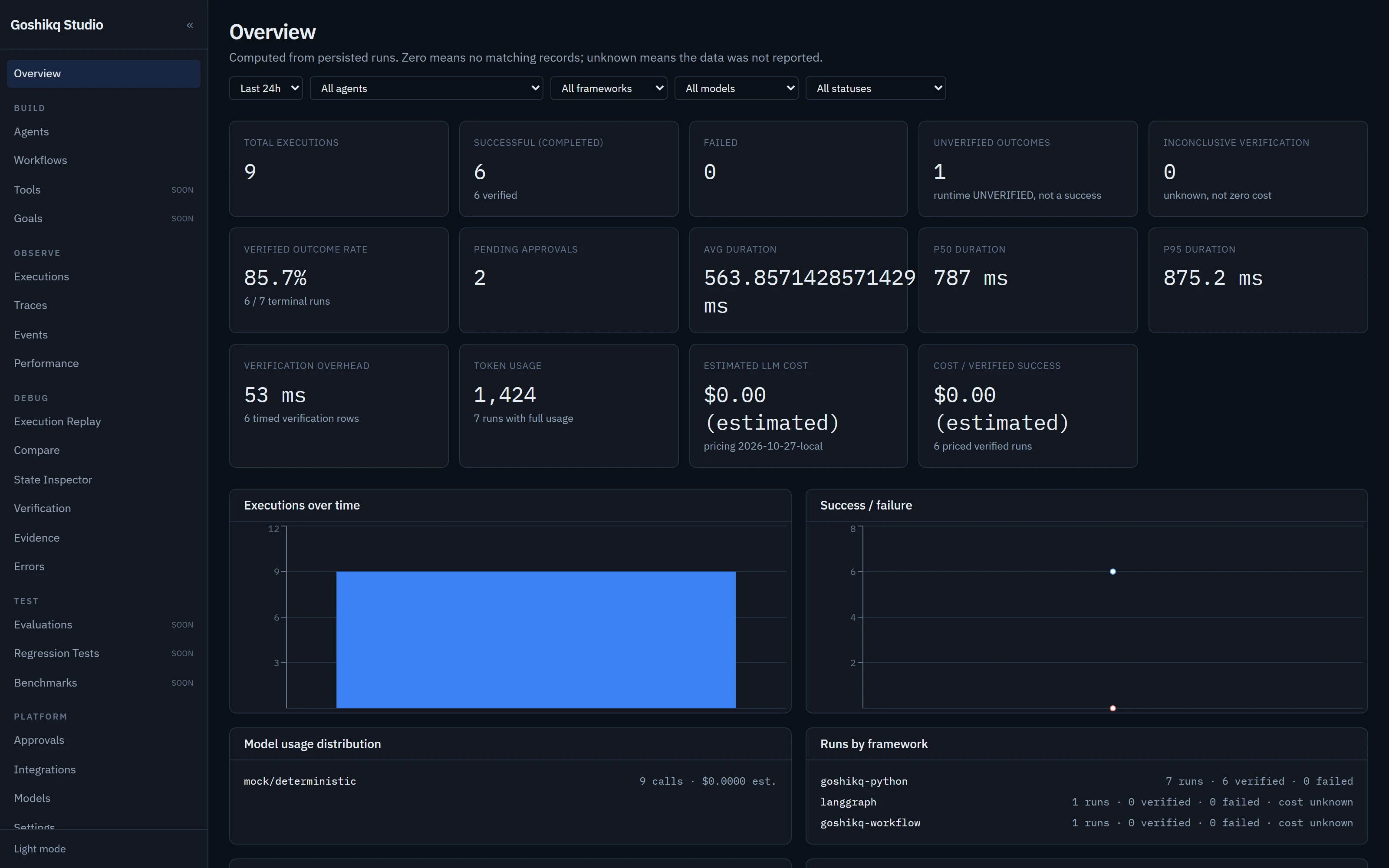
Persisted events, SSE, traces, replay (GET-only), comparison, and failure analysis in Studio.
Agents, tools, goals, and workers. pip install goshikq-ai==1.0.1 and npm install @goshikq/sdk@1.0.1. An SDK does not start the runtime.
MCP stdio allowlists, A2A JSON-RPC, OTLP ingest. LangGraph traces stay UNVERIFIED. Temporal is planned.
Developer console for executions. Tools/Goals/Evaluations remain labeled soon.
Python and TypeScript SDKs talk to the Rust runtime. The runtime owns execution, checkpoints, the action journal, evidence, and outcome verification. Studio reads persisted data; it does not schedule work.
Apache 2.0 monorepo. Rust runtime, Python and TypeScript SDKs, Next.js Studio.
GitHub Actions on main: rust, SDKs, Studio, Playwright, integration, docker-smoke, security scans.
No SOC 2 / HIPAA / PCI claim. Rust crates are not on crates.io. Stable v1.0.1 is the GitHub Release, PyPI package, and npm package. Windows ARM64 is experimental.